Audio/Visual Sense-Making
Last year we started looking at sense-making activities for the presentation phase of a lesson. Our first post introduced the idea; our second listed types of sense-making activities with brief examples. Now, we’re making our way through each type with more detailed examples and potential usage guidelines.
In recent months, we’ve looked at games for sense-making, objective exercises, and information gap activities. The focus of this post is on audio/visual prompts. As you read through the examples and guidelines below. Keep in mind:
Our Definition of Sense-Making Activities: Here on Master Teaching, we’re defining sense-making activities NOT as practice exercises or tasks that follow up on the presentation of new material. Rather, they are presentation phase activities that guide students to make sense of new information before or in place of a lecture or explanation given by the teacher or textbook.
Your Participation: We’d love to hear from you about your sense-making activities. If you’d like to submit an activity or report on one you’ve used, you can post a comment below or communicate with us privately through our contact us page.
Now, let’s talk about using audio/visual prompts as sense-making activities during the presentation phase of a lesson.
Definition
An audio/visual prompt offers a representation of new content that learners figure out in some way. In some cases, these prompts are used as support for or in combination with other types of sense-making activities. At other times, they stand alone. They may be based on pre-existing and even well-known representations of content. Alternatively, they may be designed by the teacher in order to help learners figure out and understand new information.
Guidelines
1. Audio/visual prompts are used in ways that help learners make sense of new information rather than visualizing or practicing what has already been learned. In other words, they are set up so that terms or concepts are processed as learners do something with the prompt.
2. Some things that learners do with an audio-visual prompt include interpreting, analyzing, manipulating (using their hands), completing, and/or designing
3. The prompt should fit with learners’ level. When using a pre-existing prompt, language may need to be simplified or support given so that learners are not distracted by words or content that is not the focus of the activity.
4. Regardless of learners’ level, the audio/visual prompt should not overwhelm them with too much information. Rather, it should provide just enough information, presented with clear and succinct language and visuals that help rather than distract, in order to lead learners to good conclusions and reach the goals of the activity.
5. Close monitoring and feedback while learners are working in groups and/or a follow up discussion are important in order to help learners come to particular conclusions and reach the goals.
6. When giving feedback while monitoring, teachers may want to be direct about what groups are doing well but indirect about what needs to be corrected. They could, for example, point to a conclusion and ask a guiding question or suggest learners reassess. This indirect approach helps learners continue the process of sense-making
An Illustration
As an illustration, before reading the paragraphs below, scroll up to the cover photo/video. (And if needed, press play.) See what you can deduce from the video by answering the questions below.
- What different types of audio/visual prompts are represented? (Some of the categories are broad. What might be included in these broad categories?)
- Which ones have you used before to learn or teach something new?
- How did they work? In other words, which of the verbs were you or your students doing while learning and how?
- How do you imagine the others might work?
- What would you add (to the types of audio/visual prompts or to the verbs)?
The paragraphs below will help you confirm, expand, or revise your conclusions.
Types and Ways of Using
Some different types of audio/visual prompts include:.
- graphs
- diagrams
- infographics
- posters
- charts
- maps
- mind maps
- photos or pictures
- audio or video clips of speeches or lectures, TV programs or movies, advertisements, podcasts, songs, books, etc.
You’ve likely used many of the audio/visual prompts listed above to support your teaching. Have you also used them as (part of) a sense-making activity? How? If not, consider how you could use some of the types above in one of the ways below.
1. Interpreting: In our last post, you saw how information gap activities might include an audio/visual prompt that learners are interpreting by summarizing or paraphrasing it. Both Running Dictation and Bilingual Dictation give examples of how this might work.
2. Analyzing: Learners look for patterns in an audio/visual prompt or deconstruct it as a means of figuring out new information.
3. Manipulating: Learners organize or reconstruct an audio/visual prompt as a way to understand the content it represents.
4. Completing: Learners complete an audio/visual prompt. The part that is already finished for them acts as a pattern so that they are able to figure out the rest of the content and complete the prompt.
5. Designing: Learners create an audio/visual prompt to represent new content and then compare it to other groups’ representations, an original, or one designed by the teacher.
Examples
In the examples below, the types of audio/visual prompts are in bold; the ways of using them (the verbs) are underlined.
1. Learning Speech Acts in Oral English Class
At an English institute in the U.S., a common way to teach a function (or a speech act) in oral English classes was to show video clips from TV programs or movies and have students analyze different examples. One approach was for learners to watch a clip without sound and complete the prompt by filling in the blanks in a script of the dialog or guessing what was being said, followed by a level appropriate discussion in which they analyzed how to perform the speech act politely in different situations.
The chart below illustrates a second alternative, an analysis activity that could be used during the presentation phase of a lesson on apologizing appropriately.
| People | Situation | Words and Methods | |
| Clip 1 | |||
| Clip 2 | |||
| Clip 3 | |||
| Clip 4 |
While watching each video clip, students write down who is talking to whom and what their relationship is, the situation (the offense), and some of the words and methods that are used to apologize. After filling out the chart, students work in pairs or groups to compare the examples, figure out reasons for differences, and come to some conclusions about “rules” for apologizing in English in American culture. In a whole class follow up discussion, they confirm and revise their conclusions.
2. Mind Maps for Reading/Listening
Mind maps resonate with my colleagues in China, likely because they also resonate with their students especially when working with a reading/listening passage that is three, four, or even five steps above the learners’ level rather than “i + 1.” In some cases, my colleagues will create the mind map and partially fill it in. Learners then work in pairs or groups and complete it by interpreting and analyzing the passage. In other cases, particularly when students have grown comfortable with mind maps, they will design their own as a means of figuring out the passage. In a follow up discussion, learners check their ideas against the teacher’s.
3. Beginning Level ESL
In a beginning level ESL class in the U.S., the textbook unit included exercises to help students learn the names of some different countries. Before the direct teaching in the textbook, each student first found their home country on a large world map and labeled it on their individual map. Then, they took turns helping one another find and label their countries. Finally, they identified and labeled other countries they knew. In this way, they completed their individual maps while learning how to say and spell their own and their classmates’ countries in English.
4. Future Teachers Program
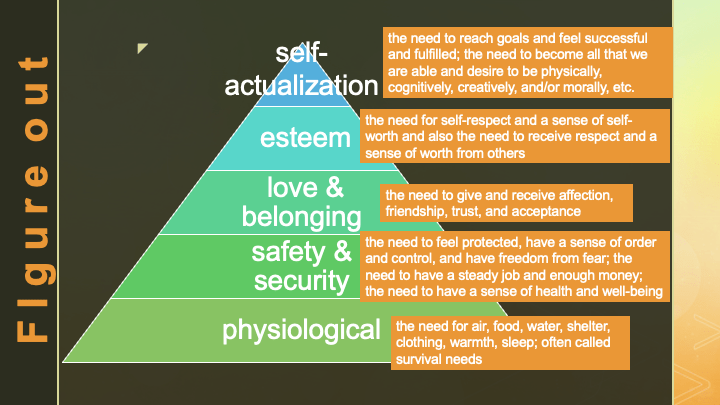
I’ve mentioned the Future Teachers Program at my university in China. What I haven’t explicitly mentioned is how audio/visual prompts are used to help learners figure out content. The objective exercises post briefly mentioned how they learned Maslow’s Hierarchy of Needs. Now, I can add that prior to class, I made a level appropriate version of the pyramid graph for them, In class, I gave a set of graph pieces to each group. Groups manipulated the pyramid, matching levels to descriptions and reconstructing it. As they worked, my feedback ensured each group got it right, but then they also had a chance to see the original on the screen. (See below.)
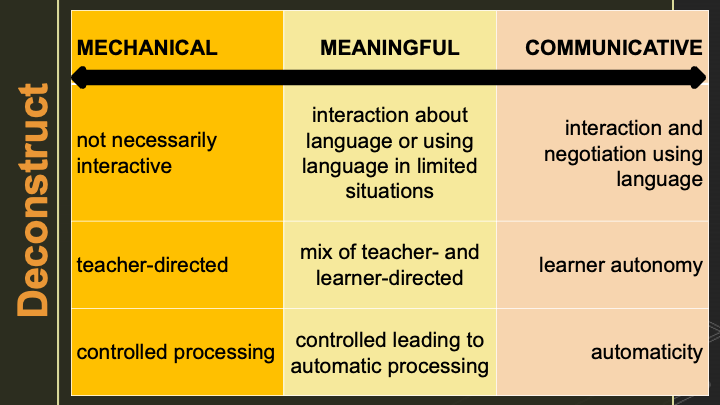
When we reached the sorting exercise in the Learning Activity Deconstruction, groups manipulated pieces of a diagram until–with some feedback from me–their version resembled the one they then saw in my PowerPoint presentation. (The second page is included below.)
Further exploration
Two easy-to-use online tools with free versions:
- Canva offers a wide variety of templates for remaking or designing different audio/visual prompts in various styles. (The cover video was made with Canva.)
- Padlet is a virtual bulletin board tool that provides an easy way for learners to share audio/visuals they have designed.
Try it out
What audio/visual prompts for sense-making have you used during the presentation phase of a lesson, and how? What types would you add to our list, or what examples could you share? You can respond in the comments below or in a private message through our Contact Us page.
Post Author

 Master Teaching
Recent Comments